
Organize Anything with AI Agents

A common problem most people experience using AI chatbots is a faulty memory, where fine details get lost the longer you continue a thread, and often the quick solution is to start a new chat. However, that also means starting from scratch and providing all the context you need to carry from chat to chat.
Some tools allow custom instructions that let you prefix every new chat with important details as a starting point. Others have a way to provide instructions and documents so the agent can use RAG (Retrieval Augmented Generation) to extract snippets of your data while planning a response.
Tools like this are sticky; they lock you into one platform or another because of the annoying export process to take your data somewhere else. Wouldn’t it be nice if you could maintain platform-agnostic control over your info, so that you could use any AI agent you want?
With a couple of basic, open-source developer tools, you can do exactly that.
Foundational Technology
Software engineers have written a lot of code over the last few decades, and long ago worked out efficient tools to manage it all. The modern internet is essentially built on top of these foundational tools.
Git is a version control tool created by Linus Torvalds, the creator of Linux, and allows anyone – not just developers – to maintain and track the state of files over time. Because it was designed by a software engineer for software engineers, it has a lot of smart features, like efficient storage, who made a change, and when they made it. It is free, fast, and battle-tested over billions, if not trillions of lines of code. And all AI agents are experts at using it.
Markdown is a lightweight file format created by John Gruber of Daring Fireball to capture and describe all the features of HTML in simple, portable text. It makes for a fantastic organizing tool, and is the native language of every AI model and agent.
With just these two free, open-source tools and an AI agent, you can organize practically anything, or an AI can use the tools to do it for you.
Organizing Principles
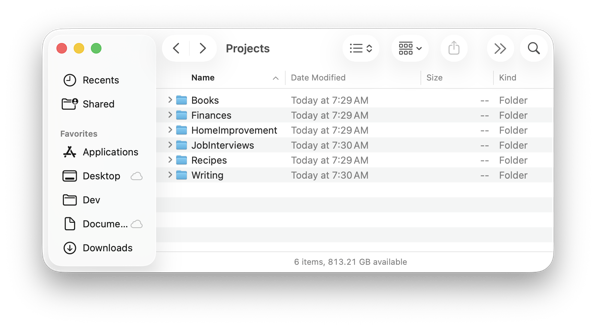
An easy way to organize all the things is to group them into projects. Your grandmother’s recipes? That’s a project. Your financial goals, a project. Home improvements, project. And so on.
Give every project its own folder, and if you want to be really slick, make them siblings on your hard drive. You could easily have a top-level AI working in the parent folder, with visibility into every project at the same time.
Now think about what is useful to have in any collaborative project, because that’s what this will ultimately be: a long-term project you will collaborate on with an agent.
First you know you’ll want some instructions for the agent itself, that describe what it does, how it will perform its tasks, and the structure and contents of the project folder. Anthropic likes to use a markdown file called CLAUDE.md for this, but the industry has coalesced into a general AGENTS.md file instead, and Claude is okay with that too.
The AGENTS file is for an AI, but you might want a human version of that too, which explains the project but skips all the agent rules. It could explain how to set it up on a new computer, for example. The industry standard name for these kinds of files is README.md.
You probably want some kind of index, that explains where to quickly find things. That could live in the AGENTS file, but would be more concise in its own ProjectIndex.md file.
Because your agent will be doing different tasks in your project, you may want to have a TASKS.md file to keep track of progress on various goals.
Notice we’re using markdown for our text files with all the project rules and details. The more techy of you will also recognize that I’m describing a git repository.
The beauty of a system built with these tools is the repo becomes your AI’s long-term memory, and all the organizational elements provide context. You can create as many agents and chat threads as you want; they’ll all have the current context from the start.
Next, it is a good idea to create spaces for you to work, spaces for the agent to work, and spaces to collaborate together. We can use folders for that.
The human workspace
For the human workspaces, you can think of these as where your original project data goes. Some of this data will be sensitive stuff that you want to keep separate and treated differently. I call these spaces
- sources/
- sensitive/
You can think of this data as something that could be rebuilt if needed, and not a permanent part of the project. (So don’t keep your only copies here!)
We will use a feature of git, the .gitignore file, to keep these folders from becoming a permanent feature of your repository. That means you can put anything in them, including other repos, and back up your project to the cloud or a local NAS without unnecessary bloating. Having an agent that can see other repos/projects at the same time is a huge unlock.
The AI agent workspace
The AI agent will occasionally need a temporary workspace. Anything in this bucket will be ephemeral and may disappear when the agent is done with it. This will also be part of the .gitignore file, not permanently in your git repo.
- scratch/
The collaborative spaces
The collaborative spaces where you and your AI agent will manage files and folders are the permanent pieces of your project. The instructions, organizing rules, and organized information the agent creates sit in your collaborative spaces.
- README.md: instructions for you, how you use the project
- AGENTS.md: instructions for the AI agent
- ProjectIndex.md: a roadmap to all the information stored in the project
- TASKS.md: shared plans + current progress
- inbox/: drop your raw stuff, the agent processes, routes, and moves it to where it should go
- archive/: timestamped shared history, processed inbox files, completed task artifacts. “What happened”
Of all the projects I’ve built and managed with AI agents, this is the common scaffold between all of them, and what I believe is the minimum needed to manage any project in this system. A well-constructed agent will understand these rules and create a relentlessly self-organized project using them.
Extended use cases
However, it doesn’t cover all the possibilities. There are quite a number of other use cases that get more specific and have more specific needs.
For example, a project to manage your career will need to track your accomplishments and goals, and have resources that help you generate a current resume, including a resume fine-tuned to a specific role and company you’re targeting.
Other use cases include a financial planner that includes lots of different file types with different levels of sensitivity to manage. Teachers looking to organize their classrooms require even more granular folders, especially if they teach multiple subjects. Marketing projects need to track campaigns, metrics, and results. Executive assistants need to stay extremely organized to be effective, and sometimes have additional requirements based on the executives themselves.
Researchers, recruiters, product managers, and designers all have their own custom requirements, and one size rarely fits all. But a well-designed AI agent project can manage them all.
Bootstrap your project with Claude
The possibilities are endless, and starting from scratch may feel daunting. Fortunately, I have a starter kit based on the last couple of years of creating these projects.
My projects include managing the smart devices in my home as I go through and replace dumb switches and outlets with their smart counterparts. For that one, I even supplied a photo of my garage sub-panel and its labeled breakers, allowing the agent to add the breaker to turn off for each organized room.
I have projects to manage my career, my team at work, and my finances. I can easily review my subscriptions and drop the ones that don’t make sense any longer. All my creative writing ideas over the last 30 years are incredibly well-organized now, and sorted based on my interests today and what I might want to spend some time on. Same with my potential business ideas. My book library, both physical and digital, is on its way to being comprehensively organized. The list goes on and on.
I even have a project for organizing the Claude skills I’m creating, which includes a skill to create all of these different projects here:
AI agents like Codex, Cursor, and even open-source local models can use this, but it’s set up to use with Claude. If you run the desktop Claude app, you can use the Customize function to upload it. Then you can invoke it directly in Claude Cowork or Code, or just tell it to set up a new project. The skill will ask a few questions to understand what type of project to create, and you’ll be on your way.
Final Thoughts
There are unlimited ways to benefit from using AI, and everyone will have their own system that works well for them. I’ve given you one idea from a software developer’s perspective, and tried to keep it extremely flexible to support almost any use case, using any AI agent. Because it’s built on git, you can easily back up your project online on sites like GitHub or GitLab.
The skill is open-source, so you can fork it, customize it, and make it your own. Or you can steal some of the ideas and start from scratch. With these tools, it’s never been easier!
If you use the project-setup skill to create something useful, I’d love to hear about it!