-
Organize Anything with AI Agents

A common problem most people experience using AI chatbots is a faulty memory, where fine details get lost the longer you continue a thread, and often the quick solution is to start a new chat. However, that also means starting from scratch and providing all the context you need to carry from chat to chat.
Some tools allow custom instructions that let you prefix every new chat with important details as a starting point. Others have a way to provide instructions and documents so the agent can use RAG (Retrieval Augmented Generation) to extract snippets of your data while planning a response.
Tools like this are sticky; they lock you into one platform or another because of the annoying export process to take your data somewhere else. Wouldn’t it be nice if you could maintain platform-agnostic control over your info, so that you could use any AI agent you want?
With a couple of basic, open-source developer tools, you can do exactly that.
Foundational Technology
Software engineers have written a lot of code over the last few decades, and long ago worked out efficient tools to manage it all. The modern internet is essentially built on top of these foundational tools.
Git is a version control tool created by Linus Torvalds, the creator of Linux, and allows anyone – not just developers – to maintain and track the state of files over time. Because it was designed by a software engineer for software engineers, it has a lot of smart features, like efficient storage, who made a change, and when they made it. It is free, fast, and battle-tested over billions, if not trillions of lines of code. And all AI agents are experts at using it.
Markdown is a lightweight file format created by John Gruber of Daring Fireball to capture and describe all the features of HTML in simple, portable text. It makes for a fantastic organizing tool, and is the native language of every AI model and agent.
With just these two free, open-source tools and an AI agent, you can organize practically anything, or an AI can use the tools to do it for you.
Organizing Principles
An easy way to organize all the things is to group them into projects. Your grandmother’s recipes? That’s a project. Your financial goals, a project. Home improvements, project. And so on.
Give every project its own folder, and if you want to be really slick, make them siblings on your hard drive. You could easily have a top-level AI working in the parent folder, with visibility into every project at the same time.
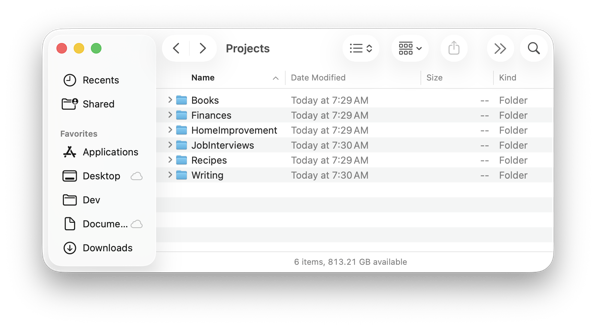
Now think about what is useful to have in any collaborative project, because that’s what this will ultimately be: a long-term project you will collaborate on with an agent.
First you know you’ll want some instructions for the agent itself, that describe what it does, how it will perform its tasks, and the structure and contents of the project folder. Anthropic likes to use a markdown file called CLAUDE.md for this, but the industry has coalesced into a general AGENTS.md file instead, and Claude is okay with that too.
The AGENTS file is for an AI, but you might want a human version of that too, which explains the project but skips all the agent rules. It could explain how to set it up on a new computer, for example. The industry standard name for these kinds of files is README.md.
You probably want some kind of index, that explains where to quickly find things. That could live in the AGENTS file, but would be more concise in its own ProjectIndex.md file.
Because your agent will be doing different tasks in your project, you may want to have a TASKS.md file to keep track of progress on various goals.
Notice we’re using markdown for our text files with all the project rules and details. The more techy of you will also recognize that I’m describing a git repository.
The beauty of a system built with these tools is the repo becomes your AI’s long-term memory, and all the organizational elements provide context. You can create as many agents and chat threads as you want; they’ll all have the current context from the start.
Next, it is a good idea to create spaces for you to work, spaces for the agent to work, and spaces to collaborate together. We can use folders for that.
The human workspace
For the human workspaces, you can think of these as where your original project data goes. Some of this data will be sensitive stuff that you want to keep separate and treated differently. I call these spaces
- sources/
- sensitive/
You can think of this data as something that could be rebuilt if needed, and not a permanent part of the project. (So don’t keep your only copies here!)
We will use a feature of git, the .gitignore file, to keep these folders from becoming a permanent feature of your repository. That means you can put anything in them, including other repos, and back up your project to the cloud or a local NAS without unnecessary bloating. Having an agent that can see other repos/projects at the same time is a huge unlock.
The AI agent workspace
The AI agent will occasionally need a temporary workspace. Anything in this bucket will be ephemeral and may disappear when the agent is done with it. This will also be part of the .gitignore file, not permanently in your git repo.
- scratch/
The collaborative spaces
The collaborative spaces where you and your AI agent will manage files and folders are the permanent pieces of your project. The instructions, organizing rules, and organized information the agent creates sit in your collaborative spaces.
- README.md: instructions for you, how you use the project
- AGENTS.md: instructions for the AI agent
- ProjectIndex.md: a roadmap to all the information stored in the project
- TASKS.md: shared plans + current progress
- inbox/: drop your raw stuff, the agent processes, routes, and moves it to where it should go
- archive/: timestamped shared history, processed inbox files, completed task artifacts. “What happened”
Of all the projects I’ve built and managed with AI agents, this is the common scaffold between all of them, and what I believe is the minimum needed to manage any project in this system. A well-constructed agent will understand these rules and create a relentlessly self-organized project using them.
Extended use cases
However, it doesn’t cover all the possibilities. There are quite a number of other use cases that get more specific and have more specific needs.
For example, a project to manage your career will need to track your accomplishments and goals, and have resources that help you generate a current resume, including a resume fine-tuned to a specific role and company you’re targeting.
Other use cases include a financial planner that includes lots of different file types with different levels of sensitivity to manage. Teachers looking to organize their classrooms require even more granular folders, especially if they teach multiple subjects. Marketing projects need to track campaigns, metrics, and results. Executive assistants need to stay extremely organized to be effective, and sometimes have additional requirements based on the executives themselves.
Researchers, recruiters, product managers, and designers all have their own custom requirements, and one size rarely fits all. But a well-designed AI agent project can manage them all.
Bootstrap your project with Claude
The possibilities are endless, and starting from scratch may feel daunting. Fortunately, I have a starter kit based on the last couple of years of creating these projects.
My projects include managing the smart devices in my home as I go through and replace dumb switches and outlets with their smart counterparts. For that one, I even supplied a photo of my garage sub-panel and its labeled breakers, allowing the agent to add the breaker to turn off for each organized room.
I have projects to manage my career, my team at work, and my finances. I can easily review my subscriptions and drop the ones that don’t make sense any longer. All my creative writing ideas over the last 30 years are incredibly well-organized now, and sorted based on my interests today and what I might want to spend some time on. Same with my potential business ideas. My book library, both physical and digital, is on its way to being comprehensively organized. The list goes on and on.
I even have a project for organizing the Claude skills I’m creating, which includes a skill to create all of these different projects here:
AI agents like Codex, Cursor, and even open-source local models can use this, but it’s set up to use with Claude. If you run the desktop Claude app, you can use the Customize function to upload it. Then you can invoke it directly in Claude Cowork or Code, or just tell it to set up a new project. The skill will ask a few questions to understand what type of project to create, and you’ll be on your way.
Final Thoughts
There are unlimited ways to benefit from using AI, and everyone will have their own system that works well for them. I’ve given you one idea from a software developer’s perspective, and tried to keep it extremely flexible to support almost any use case, using any AI agent. Because it’s built on git, you can easily back up your project online on sites like GitHub or GitLab.
The skill is open-source, so you can fork it, customize it, and make it your own. Or you can steal some of the ideas and start from scratch. With these tools, it’s never been easier!
If you use the project-setup skill to create something useful, I’d love to hear about it!
-
Introducing Aurora Toolkit 1.0
When creating something new throughout human history, there is always that moment where the idea touches the medium, and an abstract thought starts to become a tangible thing. A stick starts a line in the dirt. A pen starts a stroke on a page. A brush starts to stain a canvas. A bit starts to bite into a piece of wood. A chisel starts to reveal a masterpiece.
In our modern software development process there is an initial keystroke, but the first tangible evidence of an idea made real has a standard name: “Initial commit”. Version control systems before git had a concept of a commit, but it’s hard to imagine anyone using tools like SVN, CVS, or RCS today. So with most modern projects, it’s very easy to scroll all the way back to the initial commit.
Yesterday, after 446 days, I published version 1.0 of Aurora Toolkit – my open source Swift package for integrating AI and ML workflows in apps on Apple platforms. I know it took almost 15 months because I went back to my initial commit to see how I imagined the project from its beginning. I was surprised and delighted to see that all the core elements were in the initial idea.
The Apache License was there from the start, so it was always going to be open source. It had context management, tasks and workflows, and an LLM manager allowing you to mix, match, and combine one or more different AI and ML models (or different instances of the same model!) to create something like a mixture of experts super model for your iOS or Mac app. The one thing missing was an implementation of an actual AI model, but that would come about a week later. Figuring out how tasks and workflows worked was on my mind, and they remain two of the core features of the project today.
Features of Aurora Toolkit 1.0
- Modular Architecture: Organized into distinct modules (Core, LLM, ML, Task Library) for flexibility
- Declarative Workflows: Define workflows declaratively, similar to SwiftUI, for clear task orchestration
- Multi-LLM Support: Unified interface for Anthropic, Google, OpenAI, Ollama, and Apple Foundation Models
- On-device ML: Native support for classification, embeddings, semantic search, and more using Core ML
- Intelligent Routing: Domain-based routing to automatically select the best LLM service for each request
- Convenience APIs: Simplified top-level APIs (LLM.send(), ML.classify(), etc.) for common operations
Examples
Aurora Toolkit also includes several comprehensive examples demonstrating multiple use cases.
In one example, Siri-style routing is used, where clearly public queries are routed to powerful network LLM models like Anthropic, OpenAI, or Google, but obviously and potentially private queries stay on device.
In other examples, workflow tasks are used to fetch information from the Internet like news articles or App Store reviews, then processed, summarized, and packaged into more useful information, insights, and formats using AI.
There is even an example of two different AI models having a productive conversation about a topic – something nobody wants to listen to, but a simple and cool demonstration nevertheless.
What’s Next
My initial idea that ultimately led to this project was I wanted something to watch the git folder I was working in, and automatically generating commit message details any time the folder changed. I was working on my other project, Hamster Soup, and when I got ready to do a commit, I would copy the diffs and paste them into ChatGPT and ask for a concise git description to use for my commit. I figured I could make a widget that did that for me, and I’d just click it to copy the message to the clipboard. Somehow it became all this, waves hands around.
I still have yet to create that widget.
In the meantime, I have another project I’ve been working on, but I also plan to start a series of articles about Aurora Toolkit, how to use it, and what you can build with it. Look for that sooner rather than later, and who knows, maybe one of those articles will be how I built that git commit widget with full code included.
Compute!’s Gazette, the magazine whose type-in programs is how I actually learned to program back in the 80’s, is back after all. Maybe I’ll channel my childhood and do that article Gazette-style. :)
-
Domain classification strategies for routing to multiple models
In our first article on routing as an AI developer’s superpower, we introduced multiple strategies for domain classification that can be used by a Large Language Model (LLM) orchestrator to route a prompt to one of multiple large language models.
When you’re working with a single LLM, domain classification is often unnecessary—unless you want to pre-process prompts for efficiency, cost control, or to enforce specific business logic. These techniques may still be useful in such a scenario, but today we’re focusing on multi-model use cases.
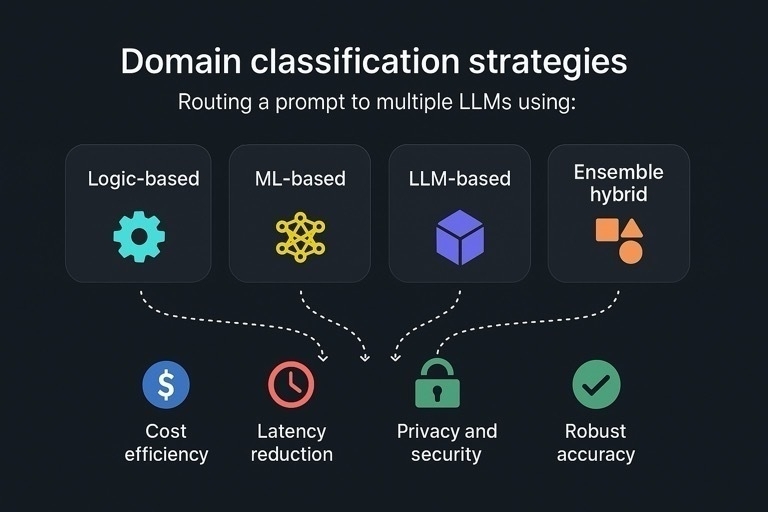
While many strategies exist, Aurora Toolkit focuses on four key classification strategies:
- Logic-based
- ML-based
- LLM-based
- Ensemble hybrid
Domain classification strategies
Using domain classification for routing strategy matters for:
- Cost efficiency
- Latency reduction
- Privacy and security
- Robust accuracy
Logic-based
Using in-app deterministic logic to determine the domain of a prompt is the fastest way to classify it on-device. Your logic could be as simple as estimating the number of tokens in a prompt, or as complex as switching logic that evaluates multiple conditions. It could also be a regex-based check for SSNs or credit card numbers to decide whether the prompt should be evaluated locally or in the cloud.
Logic-based classification often gives you high cost efficiency, latency reduction, and privacy and security. It may give you accuracy, for example matching some standard formats like credit card numbers, but that is not one of its core strengths.
For this technique, Aurora Toolkit provides LogicDomainRouter.
ML-based
Modern operating systems typically provide built-in support for running Machine Learning (ML) models on-device. Android and iOS/macOS platforms, in particular, offer powerful native frameworks—LiteRT (Google’s rebranded successor to TensorFlow Lite) and CoreML—which allow developers to train or fine-tune models using open-source tools like PyTorch and run them on-device with hardware acceleration. ML models are significantly smaller than LLMs, making them fast and easy to integrate into mobile and desktop applications.
ML-based classification gives you latency reduction, privacy and security, cost effiency, and depending on the quality of your models, may also offer strong accuracy when well-trained.
For this technique, Aurora Toolkit provides CoreMLDomainRouter.
LLM-based
In late 2022, LLMs were compelling. By 2023, their capabilities had grown so quickly that entirely new businesses were being built on top of them. In 2024, the conversation shifted—questions about AI’s impact on the job market started to get serious. And in 2025, we’re seeing it play out in real time, with memos from companies like Shopify and Duolingo indicating they’re now “AI-first” when it comes to hiring.
The point is: Large Language Models are now among the most capable classifiers available—often exceeding human-level performance for many tasks.
LLM-based classification gives you robust accuracy, and varying levels of cost efficiency, latency reduction, privacy, and security.
For this technique, Aurora Toolkit provides LLMDomainRouter.
Ensemble hybrid
While the most capable general classifiers are LLMs, they are frequently not cost-effective for such a task. Using an LLM to classify a prompt—only to then pass it to another LLM for processing—can introduce unnecessary latency and cost.
A great way to get better, more balanced results from all the previous strategies is to build an ensemble router using multiple techniques. For example, a logic-based router can be combined with an ML-based router to take your overall accuracy percentage from the 80s to the mid-90s. At scale, this could save thousands of dollars or more—especially when routing avoids your most expensive fallback LLM.
Ensemble-based classification with a highly-capable fallback option gives you the best balance of cost efficiency, latency reduction, privacy and security, and robust accuracy.
For this technique, Aurora Toolkit provides a confidence-based DualDomainRouter.
In the next article, we’ll take a deep dive into several use cases based on these domain routing strategies:
- PII filtering
- Cost and latency benchmarks
- On-device vs. cloud tradeoffs
- Building custom routers
-
Domain Routing: the AI developer's superpower
Since OpenAI released ChatGPT more than two years ago, Artificial Intelligence has advanced at an accelerating pace in capability, complexity, and quality. Equally dizzying is the number of options to harness AI–thousands of open-source LLaMA models plus powerful closed models from Anthropic, google, and OpenAI.
Many teams pick a single “best” model at first, then periodically re-evaluate as requirements change. The savviest companies and developers make use of multiple models for various use cases, suggesting the best AI would be a combination of any number of AIs. You just need a system to quickly determine which AI to consult at any given moment. This is the underlying principle of Mixture-of-Expert (MoE) large language models.
MoE systems use a kind of switchboard, determining what a particular query is about and which of its subnetworks are the best “experts” to respond to it. Criteria could be based on many factors, from what gives the highest quality response to what gives the most efficient or cheap response. Not every query needs a cannon; many only need a feather, and most lie somewhere in between. MoE systems are trained to make that determination, but developers can do this too, and be far more precise in their decision-making in most cases.
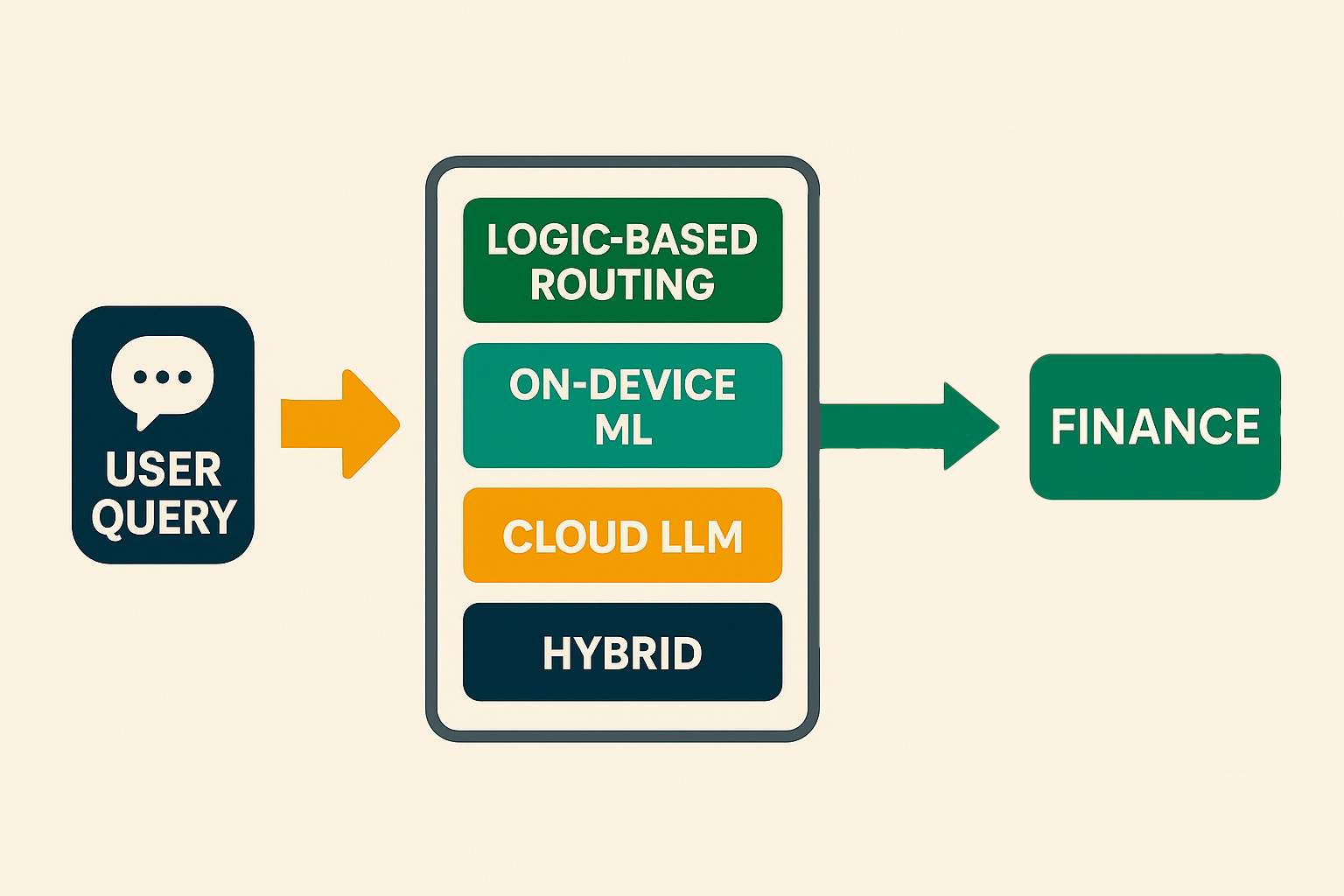
Determining which direction to turn, aka the “domain” of the query, is a powerful capability to have. By intelligently dispatching each query to the best-suited “expert,” you simultaneously optimize for cost, speed, privacy, and quality—all from a single entry point.
Why this matters
Cost efficiency
Route simple or high-volume queries through logic-based or on-device ML paths to avoid unnecessary cloud LLM calls and keep API bills in check.Latency reduction
Handle real-time or interactive prompts locally (via logic-based routing or ML classification) for sub-second responses, reserving cloud services for more complex work.Privacy and security
Keep PII and sensitive data on-device or enforce it locally via business rules, reducing the risk of exposure when you don’t need a cloud round-trip.Robust accuracy
Cross-validate ambiguous queries using dual-model or hybrid routing, boosting confidence and reducing misclassifications.This is not only important for products like our smartphones–which hold our most private information–but also critical for businesses wanting to build AI features under strict security or compliance requirements.
The four pillars of AuroraToolkit routing
With the latest release of the AuroraToolkit core library for iOS/Mac, there are now four options for domain routing to choose from covering most potential use cases. Based on the
LLMDomainRouterProtocol, the library now features:- LLMDomainRouter: a simple, LLM-based classification router
- CoreMLDomainRouter: private, offline classification router
- LogicDomainRouter: pure logic-based router, e.g. catch email addresses, credit card numbers, and SSNs instantly via regex
- DualDomainRouter: combines two contrastive routers and confidence logic to resolve conflicts
These four paradigms–cloud-based LLM, on-device ML, logic-based routing, and hybrid ensemble–cover the vast majority of real-world needs. Even more custom routing strategies can be designed by easily extending
LLMDomainRouterProtocolor its extensionConfidentDomainRouter.
In the next article, we’ll take a deep dive into domain classification strategies for routing to multiple models:
- Logic-based
- ML-based
- LLM-based
- Ensemble hybrid
-
Introducing Aurora Toolkit: Simple AI Integration for iOS and Mac Projects

Over the summer of 2024, I conducted an experiment to see if I could use Artificial Intelligence to do in a month what took several in previous years, which is to rewrite my long-running Big Brother superfan app to incorporate the latest technologies. I’ve been shipping this app since the App Store opened and every 2-3 years would rewrite it from scratch, to use the latest frameworks and explore fresh ideas for design, user experience, and content. This year, the big feature was adding AI and it seemed only natural to use AI extensively to do so – that was the experiment. The results blew my mind.
Not only was AI the productivity accelerator we’ve all been promised, but it invigorated and filled my well of ideas for what you can do with app development. As the show wound down for this year (Big Brother is a summer TV show), I had gained both a ton of experience and perspective developing with AI and ideas for how I could make this easier for others wanting to integrate it.
So even before Big Brother aired its finale, I already moved on to my next project, which became Aurora Toolkit, and the first major component of it, AuroraCore. AuroraCore is a Swift Package, and the foundational library of Aurora Toolkit.
I originally envisioned Aurora as an AI assistant, something that lived in the menu bar, or a widget, or some other quick-to-access space. AuroraCore was to be the foundation of the assistant app, but the more I developed my ideas for it, it I realized it was really a framework for any developer building any kind of app for iOS/Mac. So the AI assistant became a Swift Package for anyone to use instead.
My goals for the package:
- Written in Swift with no external dependencies outside of what comes with Swift/iOS/MacOS, making it portable to other languages and platforms
- Lightweight and fast
- Support all the major AI platforms like those from OpenAI, Anthropic, and Google
- Support open source models via Ollama, the leading platform for OSS AI models
- Include support for multiple LLMs at once
- Include some kind of workflow system where AI tasks could be chained together easily
When I use ChatGPT I treat it like Slack with access to multiple developers to collaborate with. I use multiple chat conversations, each fulfilling different roles. One of those conversations is solely for generating git commit descriptions. I gave it my preferred format for commit descriptions, and when I’m ready to make a commit, I simply paste in the diffs and ask, “Give me a commit description in my preferred format using these diffs”.
My initial use case for AuroraCore was to replicate that part of my workflow while developing my Big Brother app. I envisioned a system that watches my git folder for changes, detects updates, and uses a local llama model to generate commit descriptions in my ideal format—continuously. The goal was to streamline the process, so I could copy and paste the description whenever I was ready to commit. Ideally, there would even be a big button I could press to handle it all on demand.
I haven’t actually built that yet, but I built a framework that would make it possible. Also, ChatGPT significantly outperforms llama3 at writing good commit descriptions. I’ve got a lot more prompt work to do on that one, I’m afraid.
But approaching it with these goals and this particular use case helped me press forward down what I feel are some really productive paths. There are three major features of AuroraCore so far that I’m especially excited about and proud of.
Support for multiple Large Language Models at once
From the start, I wanted to use multiple active models, and a way to feed AI prompts to each. I envisioned mixing Anthropic Claude with OpenAI GPT, and one or more open source models via Ollama. The
LLMManagerin AuroraCore can support as many models as you want. Under the hood, they can all be the same claude, gpt-4o, llama3, gemma2, mistral, etc. models, but each can have its own setup, including token limits and system prompt. LLMManager can handle a whole team of models with ease, and understands which models have what token limits and even supported domains, and send appropriate requests to the appropriate models.Automatic domain routing
Once I started exploring using multiple models each with different domains, I made an example using a small model to review a prompt and spit out the most appropriate domain that matched a list of domains I gave it. Then I had models set up for each of those domains, so that
LLMManagerwould use the right model to respond. It became obvious that this shouldn’t be an example, but built in behavior inLLMManager, so first I added support for a model that was consulted first for domain routing. That led to creating a first class objectLLMDomainRouter, that takes an LLM service model, a list of supported domains, and a customizable set of instructions with a reasonable default. When you route a request through theLLMManager, it will consult with the domain router, then send the request to the appropriate model. The domain router is as fast as whatever model you give it to work with, and you can essentially build your very own “mixture of experts” simply by setting up several models with high quality prompts tailored to different domains.Declarative workflows with tasks and task groups
A robust workflow system was a key goal for this project, enabling developers to chain multiple tasks, including AI-based actions. Each task can produce outputs, which feed into subsequent tasks as inputs. Inspired by the Apple Shortcuts app (originally Workflow), I envisioned AuroraCore workflows providing similar flexibility for developers.
The initial version of Workflow was a simple system that took an array of WorkflowTask classes, and tied the input mappings together with another dictionary referencing different tasks by name. I quietly made AuroraCore public with that, but what I really wanted was a declarative system similar to SwiftUI. It took a few more days, but
Workflowhas been refactored to that declarative system, with an easier way to map values between tasks and task groups.The
TVScriptWorkflowExamplein the repository demonstrates a workflow with tasks that fetch an RSS feed from Associated Press’s Technology news, parse the feed, limit it to the 10 most recent articles, fetch those articles, extract summaries, and then use AI to generate a TV news script. The script includes 2-3 anchors, studio directions, and that familiar local TV news banter we all know and love—or cringe at. It even wraps up on a lighter note, because even the most intense news programs like to end with something uplifting to make viewers smile. The entire process takes about 30-40 seconds to complete, and I’ve been amazed by how realistic the dozens of test runs have sounded.What’s next
So that’s Aurora Toolkit so far. There are no actual tools in the kit yet, just this foundational library. Other than a simple client I wrote to test a lot of the functionality, no apps currently use this. My Big Brother app will certainly use it starting next year, but in the meantime, I’d love to see what other developers make of it. If someone can help add multimodal support or integrate small on-device LLMs to take advantage of all these neural cores our phones are packing these days—even better.
AuroraCore is backed by a lot of unit tests, but probably not enough. It feels solid, but it is still tagged as prerelease software for now so YMMV. If you try this Swift package out, I’d love to know what you think!
GitHub link: https://github.com/AuroraToolkit/AuroraCore